

Prabu Rangki
Tech Lead
11 min read
14 January 2026
From Chaos to Consistency: Elevating developer experience with internal tools
In the fast-paced world of a digital agency, "context switching" is our silent killer. One day you’re building a marketing site in Astro, the next you’re deep in a complex web app using Vue and TypeScript.
As a Tech Lead at Incentro Asia Pacific, my obsession isn't just shipping code, but also with Developer Experience (DX). If my team has to spend the first four hours of every new project debating trailing commas or rewriting the same date-formatting function, we’ve already lost.
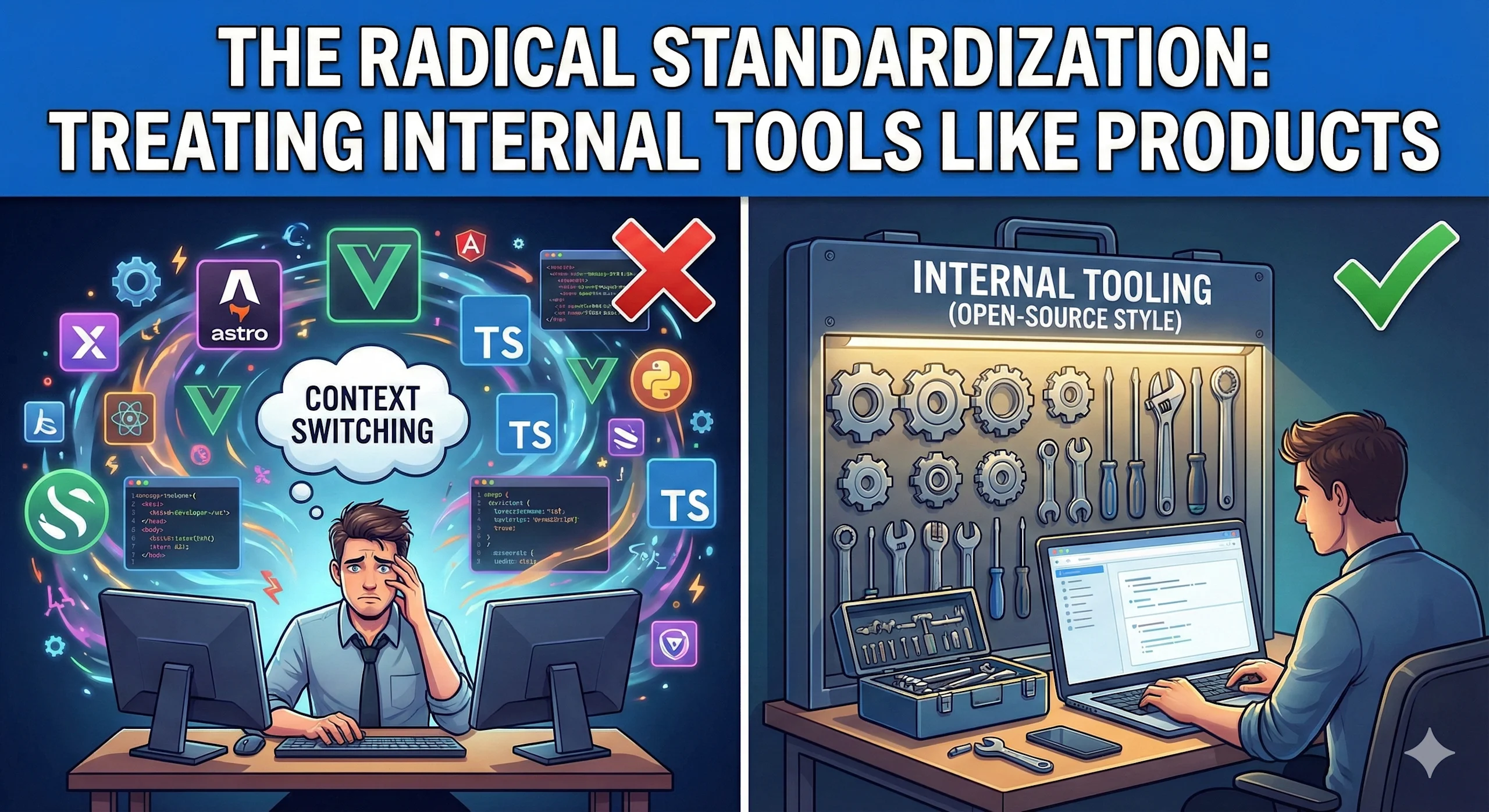
Standardization in coding is crucial for creating consistent, high-quality, and maintainable software by ensuring uniform rules for structure, style, and practices, which boosts team efficiency, speeds up onboarding, reduces errors, enhances security, and lowers long-term costs. It makes code readable and predictable for anyone on the team, preventing confusion and rework, and ensuring compliance with best practices.
That’s why I advocate for a radical approach to standardization: treating our internal tooling like open-source products.
Here is how we standardized our workflow to let our developers focus on what actually matters: solving problems.
The "Zero-Debate" Policy: Unified Linting
The most immediate friction in any team is code style. In an agency environment, this is compounded when developers rotate between projects. If Project A enforces semicolons and Project B bans them, your brain has to constantly recalibrate. In a typical agency environment, starting a new project often leads to "Configuration Bankruptcy." You spend the first day fighting with configuration files, trying to get Prettier to play nice with ESLint, or figuring out why the TypeScript parser is choking on your .vue files. Furthermore, during code reviews, debates often arise over code aesthetics, which ultimately slows down the delivery of new features.
To solve this problem, we created @vinicunca/eslint-config. This configuration was designed to do more than just enforce code styling; its primary goal was to eliminate the time and effort spent on initial setup.
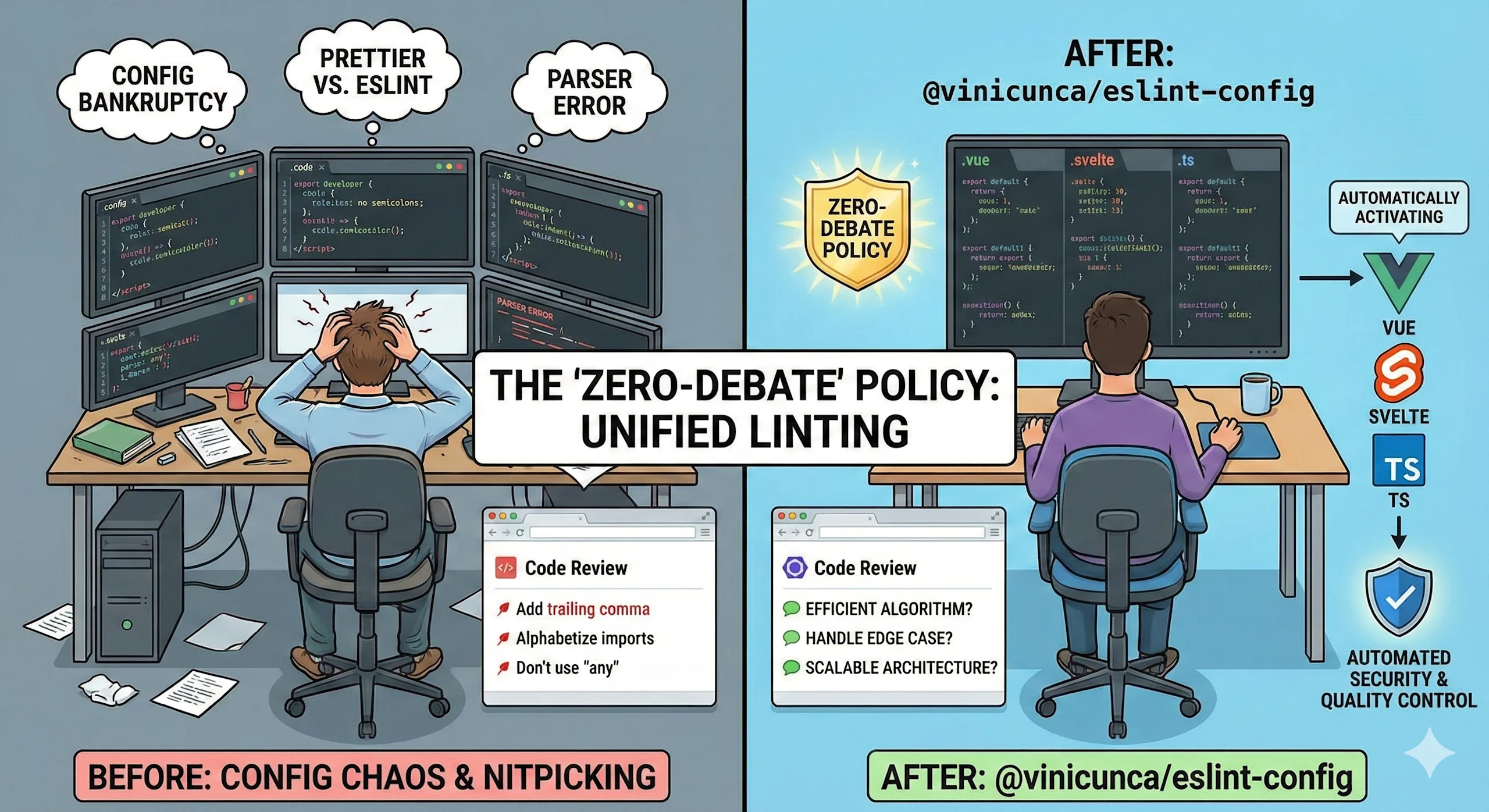
Here is the breakdown of why this specific tool is the backbone of our standardization:
It Solves the "Polyglot" Headache
Modern web development is rarely just JavaScript files. In a single monorepo, we might have:
- Astro for the marketing pages.
- Vue or Svelte for the interactive dashboards.
- TypeScript gluing it all together.
Configuring ESLint to handle all these file extensions (.astro, .vue, .svelte, .ts, .tsx) simultaneously is a nightmare. You have to juggle different parsers and processor plugins. If you get the order wrong, your linter crashes.
Our config abstracts this complexity. It auto-detects what is in the project. If it sees a Vue file, it activates the Vue rules. If it sees Svelte, it switches contexts. The developer doesn't need to know how the parser works; they just know that when they hit "Save," the code is fixed.
Code Reviews Focus on Architecture, Not Syntax
Before we built this, our Pull Request reviews were filled with "nits":
- "Please add a trailing comma here."
- "Imports should be alphabetical."
- "Don't use any type here."
This is a waste of expensive engineering time. It drains morale and distracts from the actual logic.
With @vinicunca/eslint-config acting as the "Bad Cop," the linter catches these issues locally before the code is ever pushed. This means our human code reviews are 100% focused on:
- "Is this the most efficient algorithm?"
- "Does this handle the edge case for the user?"
- "Is this architecture scalable?"
We effectively automated the "petty" part of the Tech Lead's job so we could focus on the "mentorship" part.
Beyond Aesthetics: Automated Quality & Security Control
Many developers mistakenly view linting as just "making the code look pretty." We view it as a first line of defense against bugs and security vulnerabilities.
We configured our preset to act as a strict static analysis tool. It doesn't just check for indentation; it checks for logic leaks and unsafe patterns:
- Security: It flags dangerous patterns like
v-html(in Vue) or unsanitized DOM injections that could lead to XSS attacks. - Type Integrity: It strictly forbids the usage of
anyin TypeScript, forcing developers to define their data structures clearly. - Best Practices: It catches "silent killers" like unused promises, infinite loops in reactive effects, or incorrect use of framework lifecycles.
By baking these rules into the config, we prevent junior developers from accidentally introducing vulnerabilities, and we stop senior developers from getting lazy with type safety.
The DX Win: When a developer joins a new project, they don't ask, "What are the rules here?" They just run the linter. The "red squigglies" in their code editor behave exactly the same way across 100% of our codebase.
Stop Reinventing the Wheel: The Shared Utility Belt
In the early days, I noticed a pattern. Every new project would start with a developer creating a utils/ or helpers/ directory. I like to call this a “Utils Folder Graveyard”. Inside, they would manually write the same functions we used on the last ten projects: a string slugifier, a currency formatter, an email validator, or a deep-merge function.
This is technical debt in disguise. If we find a bug in the email validator in Project A, Project B remains broken.
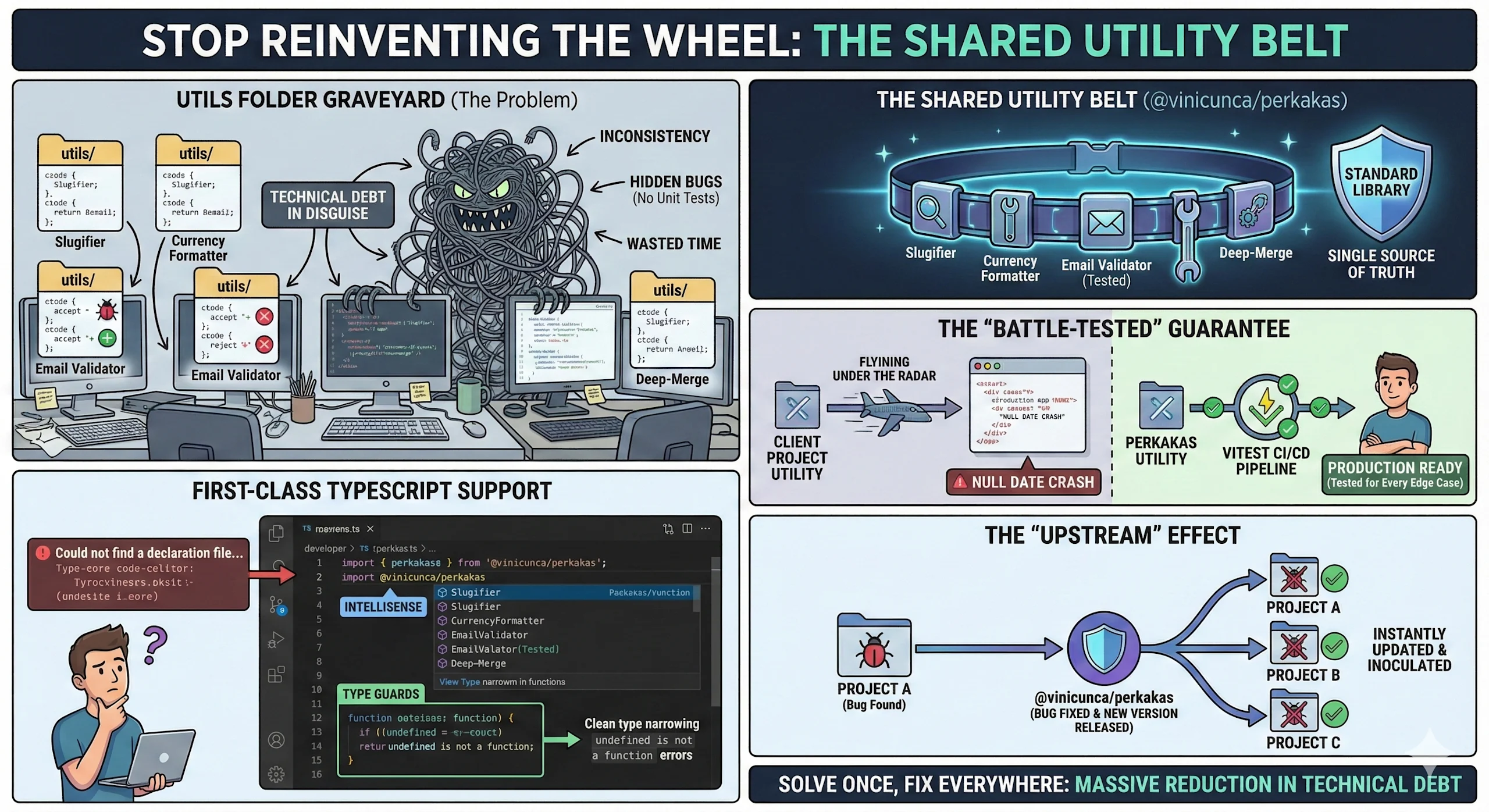
This creates three massive problems:
- Inconsistency: Project A’s email validator accepts
+signs, but Project B’s validator rejects them. - Hidden Bugs: These "quick" copy-pasted functions rarely get unit tests because they are seen as "small helpers."
- Wasted Time: We were paying senior developers to rewrite
isObjectlogic for the 50th time.
Our solution was @vinicunca/perkakas (Indonesian for "tools/utensils").
It isn’t just a random collection of scripts; it is our “Standard Library”. Here is why this shift was critical for our Developer Experience:
The "Battle-Tested" Guarantee
In a typical client project, utility functions often fly under the radar during QA. If a helper function fails on an edge case (e.g., formatting a null date), it crashes the production app.
By moving these functions into @vinicunca/perkakas, we inverted the risk. This library is rigorously tested with vitest.
- When we add a function to
perkakas, we write tests for every edge case we can think of.
When a developer imports a function, they aren't hoping it works—they know it works because it passed the CI/CD pipeline of the library itself.
First-Class TypeScript Support
Nothing kills developer flow like importing a library and seeing Could not find a declaration file for module....
@vinicunca/perkakas is written in 100% TypeScript. This provides an immediate DX boost:
- Intellisense: As soon as a developer types
import { ... } from, their IDE suggests the available tools. - Type Guards: We heavily utilize type predicates. If you use our check functions, TypeScript automatically narrows the type down, preventing "undefined is not a function" errors further down the line.
The "Upstream" Effect
The best part of this system is how it handles bug fixes. If we discover a bug in a utility function inside Project A, we don't just fix it there. We fix it in @vinicunca/perkakas, release a new version, and then simply update the package in Project B, C, and D.
We solve the problem once, and every project we maintain gets better instantly. The true efficiency of this centralized system shines through in its approach to maintenance and, crucially, bug fixes. Imagine the typical scenario without it: a common utility function is duplicated across Project A, Project B, Project C, and Project D. If a defect is discovered in Project A's version of this utility, the immediate—and often only—fix is made locally in Project A. The developers for Projects B, C, and D remain unaware, and the bug persists, lying in wait to cause issues in those other applications.
Our system fundamentally changes this chaotic process. When we discover a bug within a utility function that is being used, for example, inside Project A, we deliberately do not fix it only within that specific project's codebase. Instead, we trace the source of the issue back to its single, authoritative home: our core shared utility library, @vinicunca/perkakas.
The impact of this approach is transformative. We solve the problem once, and only once, at the root level. Every single project we currently maintain, and every new project that adopts the central package, is instantly inoculated against that bug. This eliminates repetitive work, prevents the reintroduction of known errors, and guarantees a consistent, high standard of quality across our entire portfolio of applications. The net result is a massive reduction in technical debt and a dramatic elevation of the developer experience, as time is spent building new features rather than chasing down the same old problems across multiple repositories.
The Next Horizon: A "Headless" UI Standard
With our Code Style (Linting) and Logic (Utilities) standardized, the next frontier we are tackling is the Interface.
In an agency, every client wants a unique look and feel. Client A wants a brutalist, sharp-edged aesthetic; Client B wants a soft, rounded, glass-morphic design. Because the visuals are so different, we fell into the trap of rebuilding the components from scratch every time.
We realized that while the style changes 100% of the time, the behavior is almost always the same. A Dialog always needs to trap focus. A Dropdown always needs to close when you click outside. A Combobox always needs keyboard navigation.
We are currently architecting an Internal "Headless" UI Library.
The Concept: Logic First, Style Last
The goal is to build a library of unstyled, functional components, the "skeleton" of our UI.
- The Library Handles: State management, ARIA attributes, keyboard accessibility, focus management, and event listeners.
- The Developer Handles: The CSS.
Why This Changes the Game
- Decoupling Design from Engineering: Developers won't waste days reinventing the logic for an Accordion. They will import
<UnstyledAccordion />and apply the client's branding via props or CSS classes. - Accessibility by Default: Accessibility (a11y) is hard to get right. By centralizing the component logic, we ensure that every project we ship is accessible out of the box. If we fix a screen-reader bug in the library, every client project benefits.
- Ultimate Creative Freedom: Unlike using a pre-styled library like Material UI or Bootstrap—which you have to fight to override—a headless library assumes nothing about the design. It allows our frontend team to implement the wildest designs our creative team comes up with, without fighting the code.
This is the final piece of the puzzle: enabling our developers to focus purely on the "Art" of the frontend, because the "Science" is already handled by our tooling.
The Result
The shift from isolated, project-specific development practices to a unified "Internal Open Source" model has profoundly reshaped our engineering culture and output. By treating our shared standards, configurations, and common utility libraries as internal open-source projects—with dedicated maintainers, clear documentation, and a formal contribution process—we've unlocked efficiencies that ripple across the entire organization.
Since implementing this "Internal Open Source" strategy, we've seen tangible improvements in several key areas:
- Faster Setup & Standardization: The days of complex, project-specific setup guides are over.
pnpm installis all it takes to pull in the organization's entire standard toolkit, including linters, formatters, build scripts, and core utility packages. This instant standardization eliminates "configuration drift" and ensures every project starts on a firm, consistent foundation. - Seamless Onboarding & Reduced Cognitive Load: New hires no longer have to navigate a maze of disparate coding styles and technology choices across different teams. They learn our way once, and that fundamental knowledge and toolset apply everywhere, from the smallest microservice to the largest front-end application. This dramatically shortens time-to-first-commit and allows developers to focus on business logic rather than boilerplate.
- Higher Quality Through Centralized Improvement: When a developer on Team A finds a bug in a core utility function or discovers an edge case in the shared ESLint configuration, their fix isn't isolated to their team. Bugs fixed in our tooling are instantly fixed for everyone across all projects that depend on that shared package. This collective accountability and centralized maintenance create a powerful feedback loop, driving overall code quality up exponentially faster than in siloed environments.
- Enabling Advanced Best Practices: By providing high-quality, pre-vetted tools (like a standardized logging library or a secure authentication wrapper), we make it easier for developers to follow best practices than to invent their own insecure or non-performant solutions. The "paved road" becomes the path of least resistance.
Conclusion
For any Tech Leads, Engineering Managers, or Principal Engineers reading this: Look critically at your utils folder. Examine your .eslintrc, your CI/CD configuration files, and your boilerplate setup instructions. If you see the same core logic, the same regex for input validation, or the same custom lint rule copied and pasted across three or more distinct repositories, you have not just a problem, but a magnificent opportunity to build an internal tool. Abstracting that shared logic into a well-maintained, versioned package is the first step toward transforming chaos into consistency. Your future self, and the countless hours of mental energy and maintenance burden you will save your team, will unequivocally thank you.
6 min read
The Stack Was the Workaround

1 min read
Orchestrating Growth: AI-driven workflow transformation for Indonesia’s BFSI

5 min read
Youforce automates internal support with its own AI agent

4 min read
Payter's next step with Agentic AI: from process orchestration to intelligent customer interaction